Примеры разделения датасета на train и test c Scikit-learn
Если вы разбиваете датасет на данные для обучения и тестирования, нужно помнить о некоторых моментах. Далее следует обсуждение трех передовых практик, которые стоит учитывать при подобном разделении. А также демонстрация того, как реализовать эти соображения в Python.
В данной статье обсуждаются три конкретных особенности, которые следует учитывать при разделении набора данных, подходы к решению связанных проблем и практическая реализация на Python.
Для наших примеров мы будем использовать модуль train_test_split библиотеки Scikit-learn, который очень полезен для разделения датасетов, независимо от того, будете ли вы применять Scikit-learn для выполнения других задач машинного обучения. Конечно, можно выполнить такие разбиения каким-либо другим способом (возможно, используя только Numpy). Библиотека Scikit-learn включает полезные функции, позволяющее сделать это немного проще.
from sklearn.model_selection import train_test_split X_train, X_test, y_train, y_test = train_test_split(X, y, train_size=0.67, random_state=42)Возможно, вы использовали этот модуль для разделения данных в прошлом, но при этом не приняли во внимание некоторые детали.
Случайное перемешивание строк
Первое, на что следует обратить внимание: перемешаны ли ваши экземпляры? Это следует делать пока нет причин не перетасовывать данные (например, они представляют собой временные интервалы). Мы должны убедиться в том, что наши экземпляры не разбиты на выборки по классам. Это потенциально вносит в нашу модель некоторую нежелательную предвзятость.
Например, посмотрите, как одна из версий набора данных iris, упорядочивает свои экземпляры при загрузке:
from sklearn.datasets import load_iris iris = load_iris() X, y = iris.data, iris.target print(f"Классы датасета: ")Классы датасета: [0 0 0 0 0 0 0 0 0 0 0 0 0 0 0 0 0 0 0 0 0 0 0 0 0 0 0 0 0 0 0 0 0 0 0 0 0 0 0 0 0 0 0 0 0 0 0 0 0 0 1 1 1 1 1 1 1 1 1 1 1 1 1 1 1 1 1 1 1 1 1 1 1 1 1 1 1 1 1 1 1 1 1 1 1 1 1 1 1 1 1 1 1 1 1 1 1 1 1 1 2 2 2 2 2 2 2 2 2 2 2 2 2 2 2 2 2 2 2 2 2 2 2 2 2 2 2 2 2 2 2 2 2 2 2 2 2 2 2 2 2 2 2 2 2 2 2 2 2 2]Если такой набор данных с тремя классами при равном числе экземпляров в каждом разделить на две выборки: 2/3 для обучения и 1/3 для тестирования, то полученные поднаборы будут иметь нулевое пересечение классовых меток. Это, очевидно, недопустимо при изучении признаков для предсказания классов. К счастью, функция train_test_split по умолчанию автоматически перемешивает данные (вы можете переопределить это, установив для параметра shuffle значение False ).
- В функцию должны быть переданы как вектор признаков, так и целевой вектор (X и y).
- Для воспроизводимости вы должны установить аргумент random_state .
- Также необходимо определить либо train_size , либо test_size , но оба они не нужны. Если вы явно устанавливаете оба параметра, они должны составлять в сумме 1.
Вы можете убедится, что теперь наши классы перемешаны.
from sklearn.model_selection import train_test_split X_train, X_test, y_train, y_test = train_test_split(X, y, train_size=0.67, random_state=42) print(f"Классы в y_train:\n") print(f"Классы в y_test:\n")Классы в y_train: [1 2 1 0 2 1 0 0 0 1 2 0 0 0 1 0 1 2 0 1 2 0 2 2 1 1 2 1 0 1 2 0 0 1 1 0 2 0 0 1 1 2 1 2 2 1 0 0 2 2 0 0 0 1 2 0 2 2 0 1 1 2 1 2 0 2 1 2 1 1 1 0 1 1 0 1 2 2 0 1 2 2 0 2 0 1 2 2 1 2 1 1 2 2 0 1 2 0 1 2] Классы в y_test: [1 0 2 1 1 0 1 2 1 1 2 0 0 0 0 1 2 1 1 2 0 2 0 2 2 2 2 2 0 0 0 0 1 0 0 2 1 0 0 0 2 1 1 0 0 1 2 2 1 2]Стратификация (равномерное распределение) классов
Данное размышление заключается в следующем. Равномерно ли распределено количество классов в наборах данных, разделенных для обучения и тестирования?
import numpy as np print(f"Количество строк в y_train по классам: ") print(f"Количество строк в y_test по классам: ")Количество строк в y_train по классам: [31 35 34] Количество строк в y_test по классам: [19 15 16]Это не равная разбивка. Главная идея заключается в том, получает ли наш алгоритм равные возможности для изучения признаков каждого из представленных классов и последующего тестирования результатов обучения, на равном числе экземпляров каждого класса. Хотя это особенно важно для небольших наборов данных, желательно постоянно уделять внимание данному вопросу.
Мы можем задать пропорцию классов при разделении на обучающий и проверяющий датасеты с помощью параметра stratify функции train_test_split . Стоит отметить, что мы будем стратифицировать в соответствии распределению по классам в y .
X_train, X_test, y_train, y_test = train_test_split(X, y, train_size=0.67, random_state=42, stratify=y) print(f"Количество строк в y_train по классам: ") print(f"Количество строк в y_test по классам: ")Количество строк в y_train по классам: [34 33 33] Количество строк в y_test по классам: [16 17 17]Сейчас это выглядит лучше, и представленные числа говорят нам, что это наиболее оптимально возможное разделение.
Дополнительное разделение
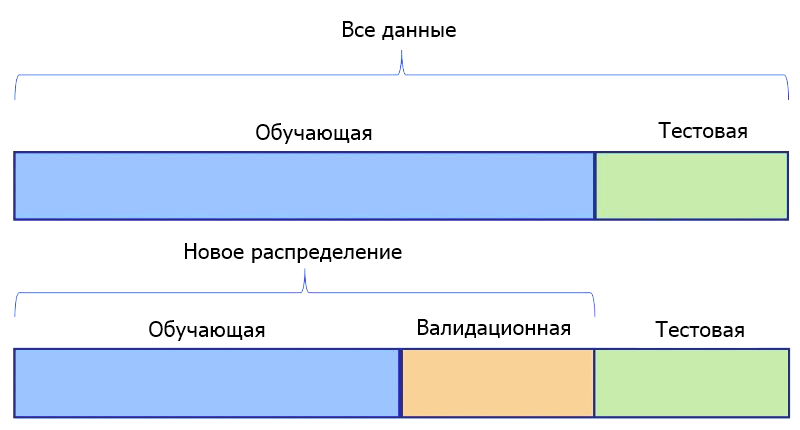
Третье соображение относится к проверочным данным (выборке валидации). Есть ли смысл для нашей задачи иметь только один тестовый датасет. Или мы должны подготовить два таких набора — один для проверки наших моделей во время их точной настройки, а еще один — в качестве окончательного датасета для сравнения моделей и выбора лучшей.
Если мы определим 2 таких набора, это будет означать, что одна выборка, будет храниться до тех пор, пока все предположения не будут проверены, все гиперпараметры не настроены, а все модели обучены для достижения максимальной производительности. Затем она будет показана моделям только один раз в качестве последнего шага в наших экспериментах.
Если вы хотите использовать датасеты для тестирования и валидации, создать их с помощью train_test_split легко. Для этого мы разделяем весь набор данных один раз для выделения обучающей выборки. Затем еще раз, чтобы разбить оставшиеся данные на датасеты для тестирования и валидации.
Ниже, используя набор данных digits, мы разделяем 70% для обучения и временно назначаем остаток для тестирования. Не забывайте применять методы, описанные выше.
from sklearn.datasets import load_digits digits = load_digits() X, y = digits.data, digits.target X_train, X_test, y_train, y_test = train_test_split(X, y, train_size=0.7, random_state=42, stratify=y) print(f"Количество строк в y_train по классам: ") print(f"Количество строк в y_test по классам: ")Количество строк в y_train по классам: [124 127 124 128 127 127 127 125 122 126] Количество строк в y_test по классам: [54 55 53 55 54 55 54 54 52 54]Обратите внимание на стратифицированные классы в полученных наборах. Затем мы повторно делим тестовый датасет.
X_test, X_val, y_test, y_val = train_test_split(X_test, y_test, train_size=0.5, random_state=42, stratify=y_test) print(f"Количество строк в y_test по классам: ") print(f"Количество строк в y_val по классам: ")Количество строк в y_test по классам: [27 27 27 27 27 28 27 27 26 27] Количество строк в y_val по классам: [27 28 26 28 27 27 27 27 26 27]Обратите внимание на стратификацию классов по всем наборам данных, которая является оптимальной.
Теперь вы готовы обучать, проверять и тестировать столько моделей машинного обучения, сколько вы сочтете нужным для ваших данных.Еще один совет: вы можете подумать об использовании перекрестной валидации вместо простой стратегии обучение/тестирование или обучение/валидация/тестирование. Мы рассмотрим вопросы кросс-валидации в следующий раз.
Train test split stratify что делает
2 min read
Jul 16, 2021What is meant by ‘Stratified Split’?
Stratified Split (Py) helps us split our data into 2 samples (i.e Train Data & Test Data),with an additional feature of specifying a column for stratification.( Example we mention the variable Age as the column for stratification then the division is done in such a way that each unique age value comes in both the Data Sets (Train /test ). In general it is a way to make subsets from several strata of the main data.
We Use the Train Data for Model Building and the Test Data for Model Testing/Validation.
This function creates two new tables where the data is bifurcated on the basis of the parameters specified by the user.
Application:
1. It is used to split our data into two sets (i.e Train Data & Test Data).
2. Train Data should contain 60–80 % of total data points
3. Test Data should contain 20–30% of total data points
Example:
Consider the above Data Set. It has 10 samples so when we use the Stratified Split(Py) function we need to specify two parameters
1: Train size ( suppose we mention 0.7 i.e 70%)
2: Stratification Variable
So the function executes and Creates two new tables containing 70% and 30% data respectively.
Input:
In ATH, to run Stratified Split(Py) select the columns of the data and then use the path: Data Management è Data Sampling/Subsetting è Stratified Split(Py)
In the ‘Train size’: Enter a suitable Value between 0–1
In the ‘Stratification Variable : Select The Variable for stratification.
Output and Interpretation:
- Train Data 70% of actual data points -
2. Test Data 30% of actual data points -
See Also: Split Data(Py), Randomness Test.
What is Stratify in train_test_split? With example
To spit data into a training set and test set, you had indeed used the train_test_split library from scikit learn. There are some parameters in train_test_split like random_state, stratify, shuffle, test_size, etc.
Here we will talk about one parameter called stratify in train_test_split in a simple way. Basically, we use stratify to create an unbiased dataset when you have a biased dataset.
Table of Contents
Why Stratify?
Suppose we have data and if that data is biased then we can have to use stratify to overcome train_test_split’s biased random sampling problem. Due to this sampling problem, the model will perform very poorly and cause problems like overfitting or underfitting. To Overcome we have to use stratify.
Understand it with the Example:
Let’s understand what it means by example:
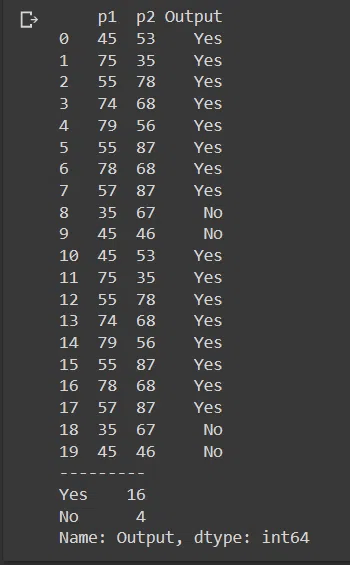
Here I have taken a sample data which has 20 columns and in which The Output Columns Consist of 16 Yes and 4 No. As you can see, this data consists of an 80/20 distribution. Hence biased data is present here.
import pandas as pd import numpy as np from sklearn.model_selection import train_test_split df=pd.read_csv("/content/sample - Sheet1(1).csv") print(df) print("---------") df['Output'].value_counts()
Let’s split the data using train_test_split and see how our data is being split without stratify parameter.
X=df.drop('Output',axis=1) Y=df['Output'] X_train,X_test,y_train,y_test=train_test_split(X,Y,random_state=101) print(y_train.value_counts()) print("\n") print(y_test.value_counts())
Here you can clearly see that y_train contains 11 Yes and 4 No. And y_test contains ONLY 5 Yes. If we provide this data to the model then the model’s performance will be poor.
To overcome this problem, we have to use stratify parameter while splitting data. This parameter is only taking the output label as an argument So we have to pass the Y set. Let’s see this in action.
X_train,X_test,y_train,y_test=train_test_split(X,Y,random_state=101,stratify=Y) print(y_train.value_counts()) print("\n") print(y_test.value_counts())
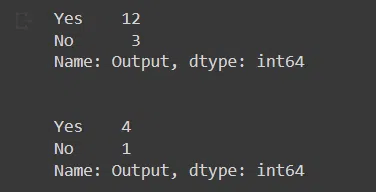
See how our prediction labels are separated in y_train and y_test by the same ratio which is 4:1 in our case. Now you can use this unbiased data for further processing.
sklearn.model_selection .StratifiedShuffleSplit
Provides train/test indices to split data in train/test sets.
This cross-validation object is a merge of StratifiedKFold and ShuffleSplit, which returns stratified randomized folds. The folds are made by preserving the percentage of samples for each class.
Note: like the ShuffleSplit strategy, stratified random splits do not guarantee that all folds will be different, although this is still very likely for sizeable datasets.
Read more in the User Guide .
For visualisation of cross-validation behaviour and comparison between common scikit-learn split methods refer to Visualizing cross-validation behavior in scikit-learn
Parameters : n_splits int, default=10
Number of re-shuffling & splitting iterations.
test_size float or int, default=None
If float, should be between 0.0 and 1.0 and represent the proportion of the dataset to include in the test split. If int, represents the absolute number of test samples. If None, the value is set to the complement of the train size. If train_size is also None, it will be set to 0.1.
train_size float or int, default=None
If float, should be between 0.0 and 1.0 and represent the proportion of the dataset to include in the train split. If int, represents the absolute number of train samples. If None, the value is automatically set to the complement of the test size.
random_state int, RandomState instance or None, default=None
Controls the randomness of the training and testing indices produced. Pass an int for reproducible output across multiple function calls. See Glossary .
>>> import numpy as np >>> from sklearn.model_selection import StratifiedShuffleSplit >>> X = np.array([[1, 2], [3, 4], [1, 2], [3, 4], [1, 2], [3, 4]]) >>> y = np.array([0, 0, 0, 1, 1, 1]) >>> sss = StratifiedShuffleSplit(n_splits=5, test_size=0.5, random_state=0) >>> sss.get_n_splits(X, y) 5 >>> print(sss) StratifiedShuffleSplit(n_splits=5, random_state=0, . ) >>> for i, (train_index, test_index) in enumerate(sss.split(X, y)): . print(f"Fold i>:") . print(f" Train: index=train_index>") . print(f" Test: index=test_index>") Fold 0: Train: index=[5 2 3] Test: index=[4 1 0] Fold 1: Train: index=[5 1 4] Test: index=[0 2 3] Fold 2: Train: index=[5 0 2] Test: index=[4 3 1] Fold 3: Train: index=[4 1 0] Test: index=[2 3 5] Fold 4: Train: index=[0 5 1] Test: index=[3 4 2]Get metadata routing of this object.
Returns the number of splitting iterations in the cross-validator
Generate indices to split data into training and test set.
get_metadata_routing ( ) [source] 
Get metadata routing of this object.
Please check User Guide on how the routing mechanism works.
Returns : routing MetadataRequest
A MetadataRequest encapsulating routing information.
get_n_splits ( X = None , y = None , groups = None ) [source] 
Returns the number of splitting iterations in the cross-validator
Parameters : X object
Always ignored, exists for compatibility.
y object
Always ignored, exists for compatibility.
groups object
Always ignored, exists for compatibility.
Returns : n_splits int
Returns the number of splitting iterations in the cross-validator.
Generate indices to split data into training and test set.
Parameters : X array-like of shape (n_samples, n_features)
Training data, where n_samples is the number of samples and n_features is the number of features.
Note that providing y is sufficient to generate the splits and hence np.zeros(n_samples) may be used as a placeholder for X instead of actual training data.
y array-like of shape (n_samples,) or (n_samples, n_labels)
The target variable for supervised learning problems. Stratification is done based on the y labels.
groups object
Always ignored, exists for compatibility.
Yields : train ndarray
The training set indices for that split.
test ndarray
The testing set indices for that split.
Randomized CV splitters may return different results for each call of split. You can make the results identical by setting random_state to an integer.