Python & EEL. Делаем просто на Python’е и красиво на JS
Тема красивых интерфейсов была и будет актуальна всегда. Кто-то использует для создания графических приложений C#, кто-то использует Java, кто-то уходит в дебри C++, ну а кто-то извращается с Python, используя tkinter или PyQT. Существуют различные технологии, позволяющие совмещать красоту графических дизайнов, создаваемых на HTML, CSS и JS с гибкостью в реализации логики приложения, которую может дать другой язык. Так вот, для тех, кто пишет на самом лучшем языке программирования Python, есть возможность писать красивые интерфейсы на HTML, CSS и JS и прикручивать к ним логику на Python.
В этой статья я хочу показать на небольшом примере, как же все таки создать простое и красивое десктопное приложение на HTML, CSS, JS и Python. В качестве библиотеки для связи всех компонентов будем использовать EEL.
Установка
Оговорюсь, что я работаю на windows 10 x64.
Для начала установим саму библиотеку выполнив простую команду:
pip install eel
После установки одной лишь библиотеки можно начинать наш путь.
Наше приложение будет выглядеть таким образом:
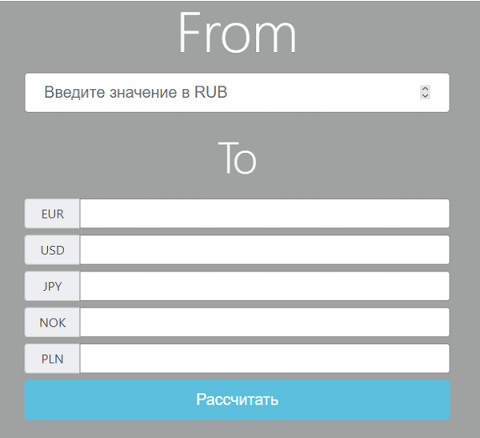
Логика приложения очень простая: при нажатии кнопки “рассчитать” считываются значения в поле для ввода рублей, полученные данные отправляются в Python, где происходит расчет курса валют. Python возвращает нам данные и мы выводим из через JS
Раскидываем по папкам
Разобьем теперь наш проект на модули. В папку “front” будем класть всё, что связано с графической частью нашего приложения. В папку “back” будем помещать все наши исходники на python. Еще создадим папку middle, в которую будем помещать методы, вызываемые из JS (об этом чуть позже). В Главной директории создадим файл main.py, он будет запускать наше приложение.

Логика на Python
В качестве теста реализуем простое приложение конвертер валют (да-да, банально, никому не надо, на гитхабе миллион проектов). Для этого на python установим библиотеку CurrencyConverter:
pip install currencyconverter
Теперь приступим к написанию логики на python. Реализуем метод, который на вход будет принимать сумму, валюту с которой нам надо перевести и валюту, на которую нам надо перевести. Создадим “convert.py” в директории “back” и запишем в него следующий код:
from currency_converter import CurrencyConverter converter = CurrencyConverter() def convert_value(value: float, from_cur: str, to_cur: str): return converter.convert(value, from_cur, to_cur)Теперь в директории “middle” создадим файл “mid_convert.py” и пропишем следующий код:
from back.convert import convert_value import eel @eel.expose def convert_value_py(value:float, from_cur:str, to_cur:str)->float: return convert_value(value, from_cur, to_cur)Что здесь вообще происходит? Файл “mid_convert.py” будет служит связующим звеном между JS и Python. Декоратор @eel.expose дает нашей программе понять, что функция, описанная ниже, может быть вызвана из JS. Таким образом, любая функция, которую мы в будущем захотим вызывать из JS, должна быть обернута декоратором @eel.expose. Очевидно, что не имеет смысла делать лишних модулей, если у вас простой проект, можно было обернуть декоратором функцию “convert_value” в модуле “convert.py”. В больших проектах разбиение программы на такие слои позволит легче расширять и оптимизировать код.
Подключаем Python к JS
Теперь подключим нашу логику на Python к самому JS. Для этого примера я использую простую страничку, сверстанную чисто при помощи HTML, CSS (или вы можете использовать популярные фреймворки, которые нужны вам для работы с графикой). Первым делом необходимо подключить библиотеку eel к самому JS:
Далее реализуем функционал кнопки “рассчитать”. По нажатию кнопки первым делом необходимо считать значение рублей и пойти по каждой валюте, чтобы перевести значение.
async function create_cur_for_rub () < // получаем значение введенных рублей let value_rub = parseFloat(document.getElementById("rub-input").value); // получаем список всех input'ов, в которые надо перевести рубли let list_curs = document.getElementById("list-cur").children; for (let div_cur of list_curs) < // берем название денежной единицы let name_cur = div_cur.getElementsByTagName("span")[0].textContent; // теперь передает значение в Python для обработки let value_cur = await eel.convert_value_py(value_rub, "RUB", name_cur)(); // выводим на экран полученное значение div_cur.getElementsByTagName("input")[0].value = value_cur; >> document.getElementById("btn-sum").onclick = create_cur_for_rub;Обратите внимание на строку “let value_cur = await eel.convert_value_py(value_rub, «RUB», name_cur)();”. Важно, что вызов функции из питона происходит в асинхронном режиме, поэтому обязательно необходимо сделать асинхронной ту функцию, в которой есть вызов Python кода. При вызове функции из eel необходимо ставить пару (), где в первые круглые скобки будут передаваться наши аргументы.
Проверим, работает ли.
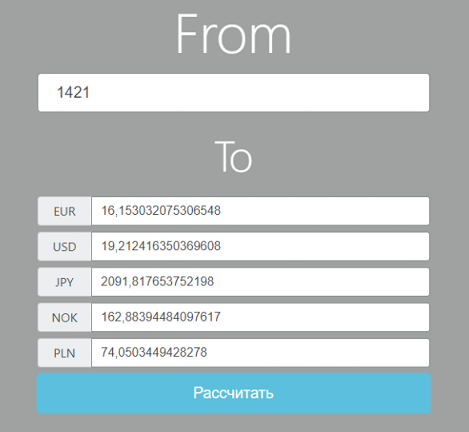
Как мы видим, все работает.
Запуск программы
Для запуска кода используем файл “main.py”. В нем импортируем библиотеку eel и всё, что мы писали в файле “min_convert.py” для того, чтобы при запуске проекта подтянуть все функции, которые мы оборачивали в eel.expose:
import eel from middle.mid_convert import *Теперь необходимо проинициализировать через eel ту директорию, где лежит front-end нашего приложения. При помощи команды eel.init(args). Далее для запуска самого приложения вызывает метод eel.start(args):
if __name__ == '__main__': eel.init('front') eel.start('index.html', mode="chrome", size=(760, 760))Метод eel.start принимает на вход несколько параметров (подробнее о них см. официальную документацию по eel). Самым интересным параметром является “mode”. При помощи него вы можете запустить свой проект, как в браузере, так и в виде отдельного приложения. Например, вы можете указать параметр “default”, в таком случае приложению будет запускать в браузере по умолчанию. Если у вас стоит google chrome, то указав параметр “mode=chrome” ваша программа откроется в виде отдельного приложения.
Также можно использовать chromium. Для этого скачиваем его с официального сайта. Разархивируем его в какую-нибудь папку и прописываем следующий код в нашем “main.py”:
eel.browsers.set_path("chrome", "C:/Users/admin/Documents/chrome-win/chrome.exe") eel.start('index.html', mode="chrome", size=(760, 760))Вывод
Как мы видим, то создавать красивые десктопные приложения с использованием Python в качестве языка для реализации основной логики не так сложно. Вы можете устанавливать какие угодно библиотеки, реализовать нужный код с использованием Python, а писать красивые интерфейсы на HTML,CSS и JS.
P.S. это моя первая статья на Habr, пишите Ваши пожелания, замечания и отзывы, буду рад увидеть любой комментарий.
Eel 0.16.0
Eel is a little Python library for making simple Electron-like offline HTML/JS GUI apps, with full access to Python capabilities and libraries.
Eel hosts a local webserver, then lets you annotate functions in Python so that they can be called from Javascript, and vice versa.
Eel is designed to take the hassle out of writing short and simple GUI applications. If you are familiar with Python and web development, probably just jump to this example which picks random file names out of the given folder (something that is impossible from a browser).
- Eel
- Intro
- Install
- Usage
- Directory Structure
- Starting the app
- App options
- Chrome/Chromium flags
- Callbacks
- Synchronous returns
Intro
There are several options for making GUI apps in Python, but if you want to use HTML/JS (in order to use jQueryUI or Bootstrap, for example) then you generally have to write a lot of boilerplate code to communicate from the Client (Javascript) side to the Server (Python) side.
The closest Python equivalent to Electron (to my knowledge) is cefpython. It is a bit heavy weight for what I wanted.
Eel is not as fully-fledged as Electron or cefpython — it is probably not suitable for making full blown applications like Atom — but it is very suitable for making the GUI equivalent of little utility scripts that you use internally in your team.
For some reason many of the best-in-class number crunching and maths libraries are in Python (Tensorflow, Numpy, Scipy etc) but many of the best visualization libraries are in Javascript (D3, THREE.js etc). Hopefully Eel makes it easy to combine these into simple utility apps for assisting your development.
Join Eel’s users and maintainers on Discord, if you like.
Install
Install from pypi with pip :
pip install eel
To include support for HTML templating, currently using Jinja2:
pip install eel
An Eel application will be split into a frontend consisting of various web-technology files (.html, .js, .css) and a backend consisting of various Python scripts.
All the frontend files should be put in a single directory (they can be further divided into folders inside this if necessary).
my_python_script.pyStarting the app
Suppose you put all the frontend files in a directory called web , including your start page main.html , then the app is started like this;
This will start a webserver on the default settings (http://localhost:8000) and open a browser to http://localhost:8000/main.html.
If Chrome or Chromium is installed then by default it will open in that in App Mode (with the --app cmdline flag), regardless of what the OS's default browser is set to (it is possible to override this behaviour).
App options
Additional options can be passed to eel.start() as keyword arguments.
Some of the options include the mode the app is in (e.g. 'chrome'), the port the app runs on, the host name of the app, and adding additional command line flags.
As of Eel v0.12.0, the following options are available to start() :
- mode, a string specifying what browser to use (e.g. 'chrome' , 'electron' , 'edge' , 'custom' ). Can also be None or False to not open a window. Default: 'chrome'
- host, a string specifying what hostname to use for the Bottle server. Default: 'localhost' )
- port, an int specifying what port to use for the Bottle server. Use 0 for port to be picked automatically. Default: 8000 .
- block, a bool saying whether or not the call to start() should block the calling thread. Default: True
- jinja_templates, a string specifying a folder to use for Jinja2 templates, e.g. my_templates . Default: None
- cmdline_args, a list of strings to pass to the command to start the browser. For example, we might add extra flags for Chrome; eel.start('main.html', mode='chrome-app', port=8080, cmdline_args=['--start-fullscreen', '--browser-startup-dialog']) . Default: []
- size, a tuple of ints specifying the (width, height) of the main window in pixels Default: None
- position, a tuple of ints specifying the (left, top) of the main window in pixels Default: None
- geometry, a dictionary specifying the size and position for all windows. The keys should be the relative path of the page, and the values should be a dictionary of the form . Default: <>
- close_callback, a lambda or function that is called when a websocket to a window closes (i.e. when the user closes the window). It should take two arguments; a string which is the relative path of the page that just closed, and a list of other websockets that are still open. Default: None
- app, an instance of Bottle which will be used rather than creating a fresh one. This can be used to install middleware on the instance before starting eel, e.g. for session management, authentication, etc. If your app is not a Bottle instance, you will need to call eel.register_eel_routes(app) on your custom app instance.
- shutdown_delay, timer configurable for Eel's shutdown detection mechanism, whereby when any websocket closes, it waits shutdown_delay seconds, and then checks if there are now any websocket connections. If not, then Eel closes. In case the user has closed the browser and wants to exit the program. By default, the value of shutdown_delay is 1.0 second
Exposing functions
In addition to the files in the frontend folder, a Javascript library will be served at /eel.js . You should include this in any pages:
Including this library creates an eel object which can be used to communicate with the Python side.
Any functions in the Python code which are decorated with @eel.expose like this.
. will appear as methods on the eel object on the Javascript side, like this.
Similarly, any Javascript functions which are exposed like this.
can be called from the Python side like this.
The exposed name can also be overridden by passing in a second argument. If your app minifies JavaScript during builds, this may be necessary to ensure that functions can be resolved on the Python side:
When passing complex objects as arguments, bear in mind that internally they are converted to JSON and sent down a websocket (a process that potentially loses information).
Eello, World!
Putting this together into a Hello, World! example, we have a short HTML page, web/hello.html :
and a short Python script hello.py :If we run the Python script ( python hello.py ), then a browser window will open displaying hello.html , and we will see.
Hello from Python World! Hello from Javascript World!. in the terminal, and.
Hello from Javascript World! Hello from Python World!. in the browser console (press F12 to open).
You will notice that in the Python code, the Javascript function is called before the browser window is even started - any early calls like this are queued up and then sent once the websocket has been established.
Return values
While we want to think of our code as comprising a single application, the Python interpreter and the browser window run in separate processes. This can make communicating back and forth between them a bit of a mess, especially if we always had to explicitly send values from one side to the other.
Eel supports two ways of retrieving return values from the other side of the app, which helps keep the code concise.
To prevent hanging forever on the Python side, a timeout has been put in place for trying to retrieve values from the JavaScript side, which defaults to 10000 milliseconds (10 seconds). This can be changed with the _js_result_timeout parameter to eel.init . There is no corresponding timeout on the JavaScript side.
Callbacks
When you call an exposed function, you can immediately pass a callback function afterwards. This callback will automatically be called asynchronously with the return value when the function has finished executing on the other side.
For example, if we have the following function defined and exposed in Javascript:
Then in Python we can retrieve random values from the Javascript side like so:
(It works exactly the same the other way around).Synchronous returns
In most situations, the calls to the other side are to quickly retrieve some piece of data, such as the state of a widget or contents of an input field. In these cases it is more convenient to just synchronously wait a few milliseconds then continue with your code, rather than breaking the whole thing up into callbacks.
To synchronously retrieve the return value, simply pass nothing to the second set of brackets. So in Python we would write:
You can only perform synchronous returns after the browser window has started (after calling eel.start() ), otherwise obviously the call will hang.In Javascript, the language doesn't allow us to block while we wait for a callback, except by using await from inside an async function. So the equivalent code from the Javascript side would be:
Eel is built on Bottle and Gevent, which provide an asynchronous event loop similar to Javascript. A lot of Python's standard library implicitly assumes there is a single execution thread - to deal with this, Gevent can "monkey patch" many of the standard modules such as time . This monkey patching is done automatically when you call import eel . If you need monkey patching you should import gevent.monkey and call gevent.monkey.patch_all() before you import eel . Monkey patching can interfere with things like debuggers so should be avoided unless necessary.
For most cases you should be fine by avoiding using time.sleep() and instead using the versions provided by gevent . For convenience, the two most commonly needed gevent methods, sleep() and spawn() are provided directly from Eel (to save importing time and/or gevent as well).
In this example.
. we would then have three "threads" (greenlets) running;
- Eel's internal thread for serving the web folder
- The my_other_thread method, repeatedly printing "I'm a thread"
- The main Python thread, which would be stuck in the final while loop, repeatedly printing "I'm a main loop"
Building distributable binary with PyInstaller
If you want to package your app into a program that can be run on a computer without a Python interpreter installed, you should use PyInstaller.
- Configure a virtualenv with desired Python version and minimum necessary Python packages
- Install PyInstaller pip install PyInstaller
- In your app's folder, run python -m eel [your_main_script] [your_web_folder] (for example, you might run python -m eel hello.py web )
- This will create a new folder dist/
- Valid PyInstaller flags can be passed through, such as excluding modules with the flag: --exclude module_name . For example, you might run python -m eel file_access.py web --exclude win32com --exclude numpy --exclude cryptography
- When happy that your app is working correctly, add --onefile --noconsole flags to build a single executable file
Microsoft Edge
For Windows 10 users, Microsoft Edge ( eel.start(. mode='edge') ) is installed by default and a useful fallback if a preferred browser is not installed. See the examples:
- A Hello World example using Microsoft Edge: examples/01 - hello_world-Edge/
- Example implementing browser-fallbacks: examples/07 - CreateReactApp/eel_CRA.py
Как объединить 5 языков программирования в одном Python проекте?

2021-09-06 в 6:00, admin , рубрики: C#, java, javascript, JS, python, десктопное приложение, несколько языков, Программирование
На сегодняшний день существует несколько тысяч языков программирования, каждый из которых создавался с определенной целью, пытаясь изменить и улучшить недостатки своих предшественников. Так, например, появился язык Kotlin, который был нацелен на замену Java в мобильной разработке. В 2010 году увидел свет язык Rust, разработчики которого пытались создать быстрый и безопасный язык, который закрывал бы многие недостатки C/C++.
Сейчас практически никто не ставит цели создать универсальный язык для всех задач и всех платформ, так как в каждой области есть свои потребности и нюансы для языка. Например, если в системной разработке требуется следить за памятью, то в местах, где нужно написать простой рабочий продукт, можно пренебречь тем, сколько памяти использует язык для своей работы.
Но что делать, если необходимо использовать несколько языков программирования в одном проекте?
Цель
Зачастую бывает так, что один язык не очень хорошо может справляться с теми задачами, которые нужно решить. Для этого программист может без проблем пересесть на другой язык. Но что делать, если уже имеется какая-то часть кода, которая написана на одном языке программирования, а другая часть кода на другом? Например, есть приложение, написанное на Python и есть какие-то структуры, модули или методы, которые написаны на Java (C/C#/JS) и уже оптимизированы с учетом этого языка, а переписывание этого кода на Python может занять много времени, да и код на Python будет выполняться намного медленнее и использовать больше памяти.
Можно попробовать объединить все эти наработки в одно приложение. Благо на сегодняшний день уже реализовано много библиотек, которые позволят без лишних проблем это сделать.
Цель статьи: попробовать написать одно приложение, где будет использоваться код, написанный на 5 разных языках программирования.
В качестве примера языки будут реализовать следующее: Cи будет проверять число на простоту методом квадратного корня, C# проверит число на простоту методом Милера-Рабина, Java проверит число на простоту методом Ферма, Python будет раскладывать число на множители, а JS будет высчитывать сумму числового ряда для полученных множителей.
P.s. примеры собраны очень примитивные, так как цель проекта - показать, как можно объединить несколько кусков кода вместе.
Java
Для того, чтобы запустить код Java из Python необходимо создать maven java проект (я пользуюсь IntellIJ). В нем создать модуль (я назвал его pkg_java) и в нем создать класс (название: JavaPrime) с логикой проверки числа на простоту методом Ферма:
package pkg_java; import java.util.*; public class JavaPrime < public static void main(String[] args) < boolean rez = is_prime_ferma(3574); System.out.println(rez); >public static boolean is_prime_ferma(int number) < Listrnd_list = new ArrayList(); int rnd_value; boolean is_prime = true; while (rnd_list.size() < 20)< rnd_value = get_rnd_value(number+1, number+100000); if ((number % rnd_value != 0) && !rnd_list.contains(rnd_value))< rnd_list.add(rnd_value); >> for (int rnd_number : rnd_list) < if (mod_pow(rnd_number, number-1, number) != 1)< is_prime = false; break; >> return is_prime; > public static int get_rnd_value(int min, int max) < return (int)Math.floor(Math.random()*(max-min+1)+min); >public static long mod_pow(long a, long b, int m) < a %= m; if (b == 0) return 1; else if (b % 2 == 0) < return mod_pow((a * a) % m, b / 2, m); >else return (a * mod_pow(a, b - 1, m)) % m; > >Далее необходимо создать .jar файл из данного модуля, для этого в File->Project Structure необходимо создать новый Jar артефакт:
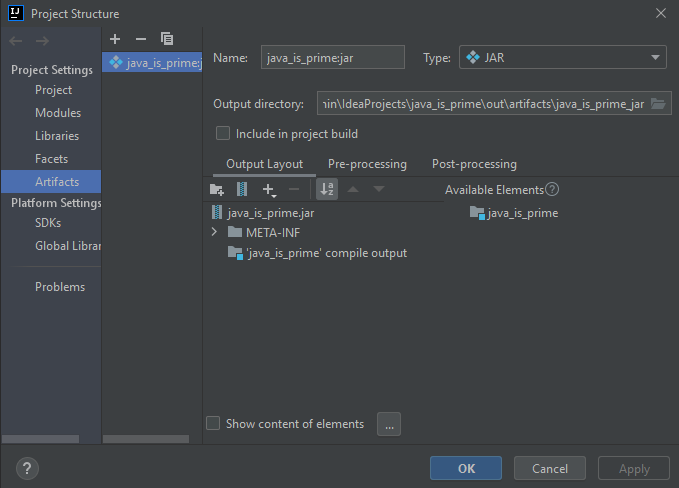
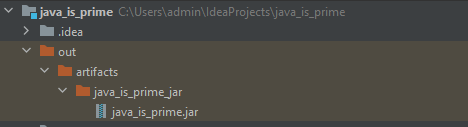
После чего выполнить Build->Build Artifacts, высветится список всех доступных артефактов, необходимо выбрать только что созданный и нажать build, в итоге будет создан .jar файл модуля.
Теперь необходимо подключить .jar файл к Python. Для этого первым делом нужно установить библиотеку JPype1, выполнив pip install jpype1 , и подключить созданный .jar к проекту:
from jpype import * jarpath = "java_is_prime.jar" startJVM(getDefaultJVMPath(), "-ea", "-Djava.class.path=%s" % (jarpath)) pkgJava = JPackage("pkg_java") java_prime_class = pkgJava.JavaPrime() print("JAVA CLASS LOADED") print("TEST JAVA:", java_prime_class.is_prime_ferma(12)) >>> JAVA CLASS LOADED >>> TEST JAVA: FalseМодуль Java был успешно загружен, теперь можно пользоваться тестом Ферма.
C#
Для того, чтоб запустить C# код в Python, нужно для начала создать библиотеку классов C# (я использовал VS2019):
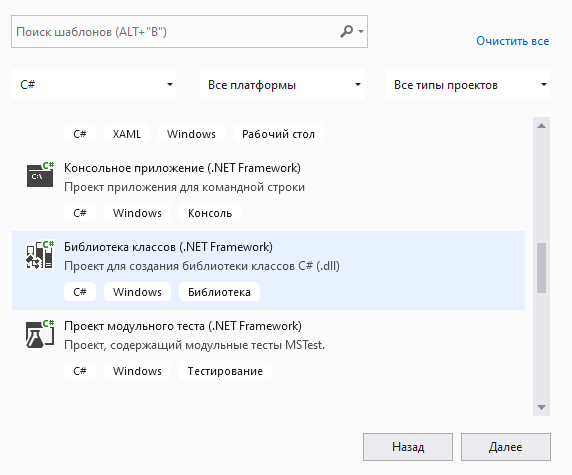
Назовем проект is_prime_csharp (данный проект в будущем будет импортироваться в Python с таким же названием). Реализуем логику алгоритма Милера-Рабин:
using System; using System.Numerics; namespace is_prime_csharp < public class miler_rabin_csharp < public static bool test_miler_rabin(int n) < if (n == 2 || n == 3) < return true; >if (n < 2 || n % 2 == 0) < return false; >// we represent n - 1 in the form (2 ^ s) t, where t is odd, this can be done by sequentially dividing n - 1 by 2 int t = n - 1; int s = 0; while (t % 2 == 0) < t = t / 2; s++; >Random rnd = new Random(); // let's take 8 rounds to determine the prime of a number. for (int i= 0; i < 8; i++) < int a = rnd.Next(2, n-2); // x ← a ^ t mod n, we calculate using the exponentiation modulo int x = (int)BigInteger.ModPow(a, t, n); if (x == 1 || x == n - 1) < continue; >for (int j = 0; j < s - 1; j++) < // x ← x^2 mod n x = (int)BigInteger.ModPow(x, 2, n); // if x == 1 then return "compound" if (x == 1) < return false; >// if x == n - 1, then go to the next iteration of the outer loop if (x == n - 1) < break; >> if (x != n - 1) < return false; >> // return "probably simple" return true; > > >Далее достаточно нажать ctrl+shift+B, чтобы скомпилировать .dll файл C# модуля. Данную .dll необходимо поместить в проект с Python.
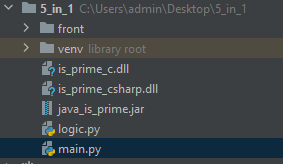
Теперь необходимо установить библиотеку pythonnet, выполнив команду pip install pythonnet . Данная библиотека позволяет рассматривать пространство имен clr как модули в python. И через python можно загрузить модуль C#:
import clr path_с_sharp = os.getcwd() + "\is_prime_csharp.dll" clr.AddReference(path_с_sharp) from is_prime_csharp import miler_rabin_csharp print("C# CLASS LOADED") print("TEST:", miler_rabin_csharp.test_miler_rabin(12)) >>> C# CLASS LOADED >>> TEST: FalseТеперь модуль C# готов к работе, методом Милера-Рабина для проверки числа на простоту можно пользоваться.
Си
Для связи С с Python сначала реализуем алгоритм квадратного корня для проверки числа на простоту:
#include #include bool is_prime_sqrt(int number) < bool prime = true; if (number == 1 || (number%2 == 0))< prime = false; >else < for (int i=2; i<=sqrt(number);i++)< if (number%i == 0)< prime = false; break; >> > return prime; >Теперь создадим .dll из сишного кода. Для этого в папке с файлом is_prime_c.c через командную строку выполним:
- gcc -c -DBUILD_DLL is_prime_c.c
- gcc -shared -o is_prime_c.dll is_prime_c.o -Wl,--add-stdcall-alias
После чего в папке появится файл .dll, который так же необходимо поместить в Python проект и подключить:
from ctypes import * c_prime = WinDLL("./is_prime_c.dll") print("C MODULE LOADED") print("TEST C:", bool(c_prime.is_prime_sqrt(12))) >>> C MODULE LOADED >>> TEST C: FalseМодуль C успешно загружен.
JavaScript
Связь Python и JS будет идти через библиотеку EEL, для этого сначала установим её в Python, выполнив pip install eel . Далее создадим HTML документ и JS файл, в HTML файле добавим eel.js и js файл с логикой суммы ряда (см подробнее проект на github). В js файле реализуем логику суммы ряда и обернем функцию дополнительно в eel.expose для того, чтобы эту функцию можно было вызвать из Python:
eel.expose(solve_example); function solve_example(list_of_numbers, x) < let sum = 0; let part = 0; for (let i in list_of_numbers) < part = list_of_numbers[i] * ((-1)**(i%3)) * (x**((-1)**i)) sum += part; >return (sum).toFixed(3); >В main.py пропишем логику запуска программы:
from logic import * import eel eel.init("front") eel.start("index.html", size=(600, 489), port=51534)С такой структурой программы:
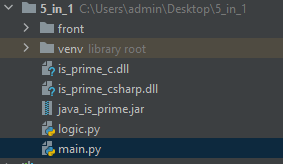
И вызовем метод JS из Python:
print(eel.solve_example([2, 2, 3], 12)()) >>> 59.833Python
Для начала реализуем метод факторизации чисел:
def factorization(number): parts = [] delim = 2 while delim**2 1: parts.append(number) return partsВ файле logic.py соберем все проверки в одной функции , чтобы данную функцию можно было вызвать из JS обернем её в eel.expose:
@eel.expose def start_proc_number_py(number): part_answer = <> part_answer["python"] = factorization(number) part_answer["c"] = bool(c_prime.is_prime_sqrt(number)) part_answer["java"] = java_prime_class.is_prime_ferma(number) part_answer["c#"] = miler_rabin_csharp.test_miler_rabin(number) part_answer["js"] = eel.solve_example(part_answer["python"], number)() rezult = <> rezult["python"] = part_answer["python"] rezult["c"] = "Простое" if part_answer["c"] else "Составное" rezult["java"] = "Простое" if part_answer["java"] else "Составное" rezult["c#"] = "Простое" if part_answer["c#"] else "Составное" rezult["js"] = part_answer["js"] return rezultРезультат
Программа имеет простой графический интерфейс:
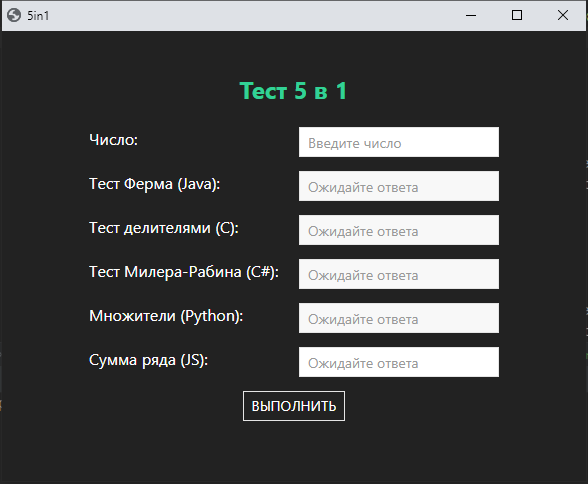
Необходимо ввести число в поле “Число” и нажать кнопку “выполнить”. После чего через JS обработать нажатие данной кнопки и вызвать метод из Python:
document.querySelector("#start-programm").onclick = async (e) => < let number = parseInt(document.querySelector("#number-js").value); let result = await eel.start_proc_number_py(number)(); show_result(result); >function show_result(dict_result)Теперь можно запустить программу и проверить, будет ли всё вместе работать:
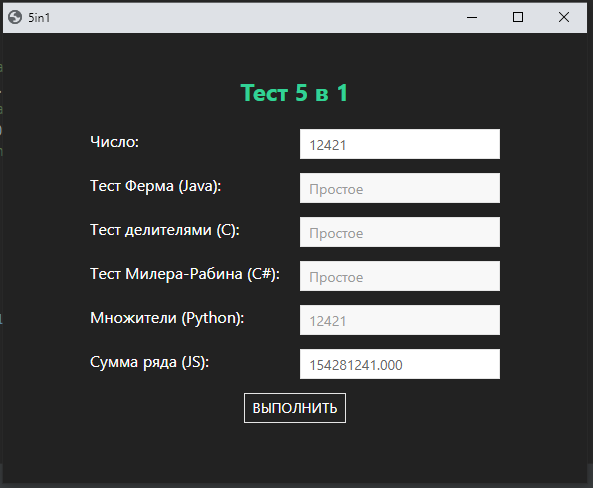
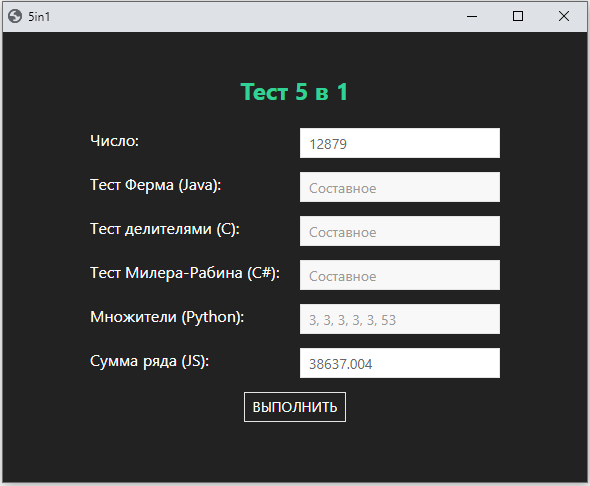
Вывод
Связать несколько языков программирования вместе в одной программе возможно, но это не совсем хорошая идея, так как при запуске программы на стороннем ПК надо быть уверенным, что у пользователя установлены нужные сервисы/зависимости/ПО, например, стоит ли JVM. Для быстрой проверки работоспособности каких-то идей, модулей, логики можно попробовать использовать подход, описанный в статье. Данный способ позволяет экономить кучу времени, вместо того, чтобы мучаться и переписывать код на другой язык в надежде, что всё будет работать как надо. Этот способ может подойти в тех случаях, когда нет возможности разработать адекватную микросервисную архитектуру приложения, а нужно использовать несколько разных кусков кода/модулей.
Как итог, получилось связать Python + JS + Java + C + C# (+ HTML + CSS) в одной программе, сделав при этом полноценное десктопное приложение, которое работает быстро без лишних задержек при обращении к методам, написанным на другом языке. В таком подходе есть плюсы: можно использовать фишки других языков (например, использовать преимущества скорости в C, Java, C# с (или без) использованием многопоточности, задействующей несколько ядер процессора, а также можно реализовывать структуры, которые будут использовать меньше памяти нежели Python).
Автор: Даниил Горбенко
Saved searches
Use saved searches to filter your results more quickly
Cancel Create saved search
You signed in with another tab or window. Reload to refresh your session. You signed out in another tab or window. Reload to refresh your session. You switched accounts on another tab or window. Reload to refresh your session.
python-eel / Eel Public
Have a question about this project? Sign up for a free GitHub account to open an issue and contact its maintainers and the community.
By clicking “Sign up for GitHub”, you agree to our terms of service and privacy statement. We’ll occasionally send you account related emails.
Already on GitHub? Sign in to your account
Using Eel calling JavaScript function in python only when a button is clicked #507
ghost opened this issue Jul 17, 2021 · 11 comments
Using Eel calling JavaScript function in python only when a button is clicked #507
ghost opened this issue Jul 17, 2021 · 11 comments
Comments
ghost commented Jul 17, 2021 •
edited by ghostDescribe the problem
I am trying to call a JavaScript function but only when a button is clicked , currently I am able to call JavaScript function but it trigger's as soon as the UI is opened how can I avoid it as am new to EelExpected When btn1 is clicked function name2 should fire in python code i.e just want to end value from js to python when btn1 in clicked
Code snippet(s)
Here is some code that can be easily used to reproduce the problem or understand what I need help with.import time import eel eel.init("web") @eel.expose def printFromPython(): return "hello from python" @eel.expose def getTime(): return time.strftime('%c') #creating a python function to use js returned vals def print_num(n): result = n print('Got this from Javascript:', result) print(result['c']) print(result['un']) print(result.keys()) print('Calling Javascript. ') eel.name2()(print_num) eel.start('main.html') .
html> html lang pl-s">en"> head> meta charset pl-s">UTF-8" /> meta name pl-s">viewport" content pl-s">width=device-width, initial-scale=1.0" /> meta http-equiv pl-s">X-UA-Compatible" content pl-s">ie=edge" /> meta name pl-s">Description" content pl-s">Enter your description here" /> link rel pl-s">stylesheet" href pl-s">https://cdnjs.cloudflare.com/ajax/libs/twitter-bootstrap/4.6.0/css/bootstrap.min.css" /> link rel pl-s">stylesheet" href pl-s">https://cdnjs.cloudflare.com/ajax/libs/font-awesome/5.15.3/css/all.min.css" /> title>Simple Demotitle> head> body> div> h3 class pl-s">text-center alert-info">Just A Simple Demoh3> p class pl-s">text-center alert-danger" id pl-s">demo">p> div class pl-s">container-fluid text-center "> input class pl-s">form-control btn btn-outline-success m-3" placeholder pl-s">Enter username" id pl-s">un"> input class pl-s">form-control btn btn-outline-success m-3" placeholder pl-s">Enter password" id pl-s">pwd"> button class pl-s">btn btn-primary m-3" id pl-s">btn1">Click Me Regular from JSbutton> div> div> script type pl-s">text/javascript" src pl-s">/eel.js">script> script src pl-s">main.js">script> script src pl-s">https://cdnjs.cloudflare.com/ajax/libs/jquery/3.5.1/jquery.slim.min.js">script> script src pl-s">https://cdnjs.cloudflare.com/ajax/libs/popper.js/1.16.1/umd/popper.min.js">script> script src pl-s">https://cdnjs.cloudflare.com/ajax/libs/twitter-bootstrap/4.6.0/js/bootstrap.min.js">script> body> html>
const d = new Date(); document.getElementById("demo").innerHTML = d; function name1() < var username = document.getElementById("un").value var password = document.getElementById("pwd").value alert(username + ":" + password); document.getElementById("un").value = "" document.getElementById("pwd").value = "" >eel.expose(name2); function name2() ; > document.getElementById("btn1").addEventListener("click", name1)Desktop (please complete the following information):
The text was updated successfully, but these errors were encountered:
ghost commented Jul 19, 2021 •
edited by ghostI've copied your code and python is throwing an exception because you are calling a JS function before eel.start() has been run.
Also, I rewrote your JS to fix syntax issues and to make it simpler.
Working code:
main.pyimport time import eel eel.init("web") @eel.expose def printFromPython(): return "hello from python" @eel.expose def getTime(): return time.strftime('%c') #creating a python function to use js returned vals def print_num(n): result = n print('Got this from Javascript:', result) print(result['c']) print(result['un']) print(result.keys()) print('Calling Javascript. ') eel.start('main.html', ) eel.name2()(print_num)main.js
const d = new Date(); document.getElementById("demo").innerHTML = d; function name1() < let username = document.getElementById("un").value; let password = document.getElementById("pwd").value; alert(username + ":" + password); document.getElementById("un").value = ""; document.getElementById("pwd").value = ""; >eel.expose(name2); function name2() < let values = < c: "Hello lp from JS", username: document.getElementById("un").value, password: document.getElementById("pwd").value, >; console.log(values.c); return values; > document.getElementById("btn1").addEventListener("click", name1)Thanks Smith pardon me for my incorrect question explanation I will try to rephrase my query suppose there is a button 4 on html now when I click on it I need values from input boxes to be passed to python so that there I can use these values is it possible here ?
`// need to send values from function name2 to python when btn4 is clicked ?
eel.expose(name2); function name2() < let values = < c: "Hello lp from JS", username: document.getElementById("un").value, password: document.getElementById("pwd").value, >; console.log(values.c,values.username,values.password); return values; > document.getElementById("btn4").addEventListener("click", name2)ofoxsmith commented Jul 19, 2021
Just get the values from HTML and pass them to a python function
eglet input1 = document.getElementById("un").value, let input2 = document.getElementById("pwd").value, eel.python_func(input1, input2);ghost commented Jul 19, 2021
Just get the values from HTML and pass them to a python function
eglet input1 = document.getElementById("un").value, let input2 = document.getElementById("pwd").value, eel.python_func(input1, input2);thanks smith kindly pardon me still i am unable to figure it out as you told now i am clicking btn4 but how to see value from python side ..like expecting to print input1 when btn4 is clicked
import time import eel eel.init("web") @eel.expose def printFromPython(): return "hello from python" @eel.expose def getTime(): return time.strftime('%c') # creating a python function to use js returned vals def print_fromjs(n): result = n print('Got this from Javascript:', result) # print(result['c']) # print(result['un']) # print(result.keys()) print('Calling Javascript. ') eel.start('main.html', ) eel.name2()(print_fromjs)const d = new Date(); document.getElementById("demo").innerHTML = d; // just a regular js func function name1() < let username = document.getElementById("un").value; let password = document.getElementById("pwd").value; alert(username + ":" + password); document.getElementById("un").value = ""; document.getElementById("pwd").value = ""; >// just calling regular js func document.getElementById("btn1").addEventListener("click", name1) // calling python function document.getElementById("btn2").addEventListener("click", function () < // here x in returned val from python eel.printFromPython()(x =>< alert(x) >) >) // calling python function 2 WITH SYNC AWAIT document.getElementById("btn3").addEventListener("click", async function getTime() < let value = await eel.getTime()(); alert(value); >) // need to send values from function name2 to python when btn4 is clicked ? eel.expose(name2); function name2() < var input1 = document.getElementById("un").value, var input2 = document.getElementById("pwd").value, console.log(input1) eel.python_func(input1, input2); >document.getElementById("btn4").addEventListener("click", name2)Collaborator
dstricks commented Jul 28, 2021main.py
import time import eel eel.init("web") @eel.expose def printFromPython(): return "hello from python" @eel.expose def getTime(): return time.strftime('%c') # creating a python function to use js returned vals @eel.expose def print_fromjs(n): result = n print('Got this from Javascript:', result) print(result['un']) print(result['pwd']) print(result.keys()) print('Calling Javascript. ') eel.start('main.html', ) # eel.name2()(print_fromjs)
main.js
const d = new Date(); document.getElementById("demo").innerHTML = d; // just a regular js func function name1() let username = document.getElementById("un").value; let password = document.getElementById("pwd").value; alert(username + ":" + password); document.getElementById("un").value = ""; document.getElementById("pwd").value = ""; > // just calling regular js func document.getElementById("btn1").addEventListener("click", name1) // calling python function document.getElementById("btn2").addEventListener("click", function () // here x in returned val from python eel.printFromPython()(x => alert(x) >) >) // calling python function 2 WITH SYNC AWAIT document.getElementById("btn3").addEventListener("click", async function getTime() let value = await eel.getTime()(); alert(value); >) // need to send values from function name2 to python when btn4 is clicked ? eel.expose(name2); function name2() var un = document.getElementById("un").value; var pwd = document.getElementById("pwd").value; console.log(un); eel.print_fromjs(un, pwd>); > document.getElementById("btn4").addEventListener("click", name2)
The key is that your Python code must expose functions that you'd like to call from JavaScript, just like you did with the getTime() . In your original code, JavaScript was trying to call function python_func but the Python code did not expose any function called python_func . Since you already had Python function print_fromjs , I just exposed that in Python and called it from JavaScript.
ghost commented Jul 30, 2021
import time import eel eel.init("web") @eel.expose def printFromPython(): return "hello from python" @eel.expose def getTime(): return time.strftime('%c') # creating a python function to use js returned vals @eel.expose def print_fromjs(n): result = n print('Got this from Javascript:', result) print(result['un']) print(result['pwd']) print(result.keys()) print('Calling Javascript. ') eel.start('main.html', ) # eel.name2()(print_fromjs)
main.js
const d = new Date(); document.getElementById("demo").innerHTML = d; // just a regular js func function name1() let username = document.getElementById("un").value; let password = document.getElementById("pwd").value; alert(username + ":" + password); document.getElementById("un").value = ""; document.getElementById("pwd").value = ""; > // just calling regular js func document.getElementById("btn1").addEventListener("click", name1) // calling python function document.getElementById("btn2").addEventListener("click", function () // here x in returned val from python eel.printFromPython()(x => alert(x) >) >) // calling python function 2 WITH SYNC AWAIT document.getElementById("btn3").addEventListener("click", async function getTime() let value = await eel.getTime()(); alert(value); >) // need to send values from function name2 to python when btn4 is clicked ? eel.expose(name2); function name2() var un = document.getElementById("un").value; var pwd = document.getElementById("pwd").value; console.log(un); eel.print_fromjs(un, pwd>); > document.getElementById("btn4").addEventListener("click", name2)
The key is that your Python code must expose functions that you'd like to call from JavaScript, just like you did with the getTime() . In your original code, JavaScript was trying to call function python_func but the Python code did not expose any function called python_func . Since you already had Python function print_fromjs , I just exposed that in Python and called it from JavaScript.
Thanks #dstricks for clarifications just what i was looking for
ghost closed this as completed Jul 30, 2021
ghost commented Jul 30, 2021import time import eel eel.init("web") @eel.expose def printFromPython(): return "hello from python" @eel.expose def getTime(): return time.strftime('%c') # creating a python function to use js returned vals @eel.expose def print_fromjs(n): result = n print('Got this from Javascript:', result) print(result['un']) print(result['pwd']) print(result.keys()) print('Calling Javascript. ') eel.start('main.html', ) # eel.name2()(print_fromjs)
main.js
const d = new Date(); document.getElementById("demo").innerHTML = d; // just a regular js func function name1() let username = document.getElementById("un").value; let password = document.getElementById("pwd").value; alert(username + ":" + password); document.getElementById("un").value = ""; document.getElementById("pwd").value = ""; > // just calling regular js func document.getElementById("btn1").addEventListener("click", name1) // calling python function document.getElementById("btn2").addEventListener("click", function () // here x in returned val from python eel.printFromPython()(x => alert(x) >) >) // calling python function 2 WITH SYNC AWAIT document.getElementById("btn3").addEventListener("click", async function getTime() let value = await eel.getTime()(); alert(value); >) // need to send values from function name2 to python when btn4 is clicked ? eel.expose(name2); function name2() var un = document.getElementById("un").value; var pwd = document.getElementById("pwd").value; console.log(un); eel.print_fromjs(un, pwd>); > document.getElementById("btn4").addEventListener("click", name2)
The key is that your Python code must expose functions that you'd like to call from JavaScript, just like you did with the getTime() . In your original code, JavaScript was trying to call function python_func but the Python code did not expose any function called python_func . Since you already had Python function print_fromjs , I just exposed that in Python and called it from JavaScript.
Thanks #dstricks for clarifications just what i was looking for
1 similar comment
ghost commented Jul 30, 2021import time import eel eel.init("web") @eel.expose def printFromPython(): return "hello from python" @eel.expose def getTime(): return time.strftime('%c') # creating a python function to use js returned vals @eel.expose def print_fromjs(n): result = n print('Got this from Javascript:', result) print(result['un']) print(result['pwd']) print(result.keys()) print('Calling Javascript. ') eel.start('main.html', ) # eel.name2()(print_fromjs)
main.js
const d = new Date(); document.getElementById("demo").innerHTML = d; // just a regular js func function name1() let username = document.getElementById("un").value; let password = document.getElementById("pwd").value; alert(username + ":" + password); document.getElementById("un").value = ""; document.getElementById("pwd").value = ""; > // just calling regular js func document.getElementById("btn1").addEventListener("click", name1) // calling python function document.getElementById("btn2").addEventListener("click", function () // here x in returned val from python eel.printFromPython()(x => alert(x) >) >) // calling python function 2 WITH SYNC AWAIT document.getElementById("btn3").addEventListener("click", async function getTime() let value = await eel.getTime()(); alert(value); >) // need to send values from function name2 to python when btn4 is clicked ? eel.expose(name2); function name2() var un = document.getElementById("un").value; var pwd = document.getElementById("pwd").value; console.log(un); eel.print_fromjs(un, pwd>); > document.getElementById("btn4").addEventListener("click", name2)
The key is that your Python code must expose functions that you'd like to call from JavaScript, just like you did with the getTime() . In your original code, JavaScript was trying to call function python_func but the Python code did not expose any function called python_func . Since you already had Python function print_fromjs , I just exposed that in Python and called it from JavaScript.
Thanks #dstricks for clarifications just what i was looking for
gracyashhh commented Oct 27, 2021
hey @dstricks Can you please help me with this, I have a very similar query and am unable to find the answers elsewhere
Describe the problem
I am trying to call a JavaScript function but only when a if condition evaluates to True in Python. I'm working on a Music player project with Pygame and Eel, I want to call the JS function to change Song cover image automatically without a button click as the previous song ends, which am finding using pygame.mixer.music.get_busy() in python, during when I want to call the 'eel.fine()' but I'm sure why it's not working or how to get this done as am new to EelExpected When if condition becomes True function find should be called from python code i.e just want to change cover image when one song ends
Code snippet(s)
Here is some code that can be easily used to reproduce the problem or understand what I need help with. Note: I have removed most part of the code just to make to understand and have only added the portions that relate to the flow of the code what I need help with.import eel from pygame import mixer eel.init('web') js='function $fine()' def my_update(): if pausev and not fine: if not start and not mixer.music.get_busy(): #ok=js2py.eval_js(js) # ok() print("booom") eel.fine() # This is the part I need help with play() print('new song up') else: print('old playing still') else: print('strictly paused')
> html lang pl-s">en"> head> meta charset pl-s">UTF-8"> meta name pl-s">description" content=""> meta http-equiv pl-s">X-UA-Compatible" content pl-s">IE=edge"> meta name pl-s">viewport" content pl-s">width=device-width, initial-scale=1, shrink-to-fit=no"> title>Aishu's Magic-Musictitle> link href pl-s">style.css" rel pl-s">stylesheet"> script type pl-s">text/javascript" src pl-s">/eel.js">script> script type pl-s">text/javascript" src pl-s">main.js">script> script type pl-s">text/javascript"> eel.expose(fine); function fine() document.getElementById("spl").live("click"); > script> script src pl-s">http://ajax.googleapis.com/ajax/libs/jquery/1.8/jquery.min.js" type pl-s">text/javascript">script> script src pl-s">https://ajax.googleapis.com/ajax/libs/jquery/1.11.1/jquery.min.js">script> link rel pl-s">stylesheet" href pl-s">https://use.fontawesome.com/releases/v5.7.2/css/all.css" integrity pl-s">sha384-fnmOCqbTlWIlj8LyTjo7mOUStjsKC4pOpQbqyi7RrhN7udi9RwhKkMHpvLbHG9Sr" crossorigin pl-s">anonymous"> head> body> section class pl-s">wellcome_area clearfix" id pl-s">home"> div class pl-s">container h-100"> div class pl-s">row h-100 align-items-center"> div class pl-s">col-12 col-md"> div class pl-s">get-start-area"> form class pl-s">form-inline"> input type pl-s">button" id pl-s">repeat" class pl-s">submit" value pl-s">▶ Shower" onclick pl-s">generateQRCode(7)"> input type pl-s">button" id pl-s">spl" class pl-s">submit" value pl-s">▶ Play" onclick pl-s">generateQRCode(2)"> input type pl-s">button" class pl-s">submit" value pl-s">>> Skip" onclick pl-s">generateQRCode(3)"> form> div> div> div> div> div class pl-s">welcome-thumb "> img id pl-s">qr" class pl-s">headshot headshot-1" src pl-s">img/bg-img/play.jpg" width pl-s">50%"> div> section> body> html>
// main.js var whatever=1; var loop_check=1; function generateQRCode(data) < if(data==2)< change() if(whatever==1)< eel.generate_qr(1)(setImage); whatever=0; >else < eel.generate_qr(data)(setImage) >> else if(data==7) < change_loop() eel.generate_qr(data)(setImage) >else < eel.generate_qr(data)(setImage) >> function change() < var elem = document.getElementById("spl"); if (elem.value=="|| Pause") elem.value = "▶ Play"; else elem.value = "|| Pause"; >function setImage(base64)Desktop (please complete the following information):